The app you download might not be the game you think it is
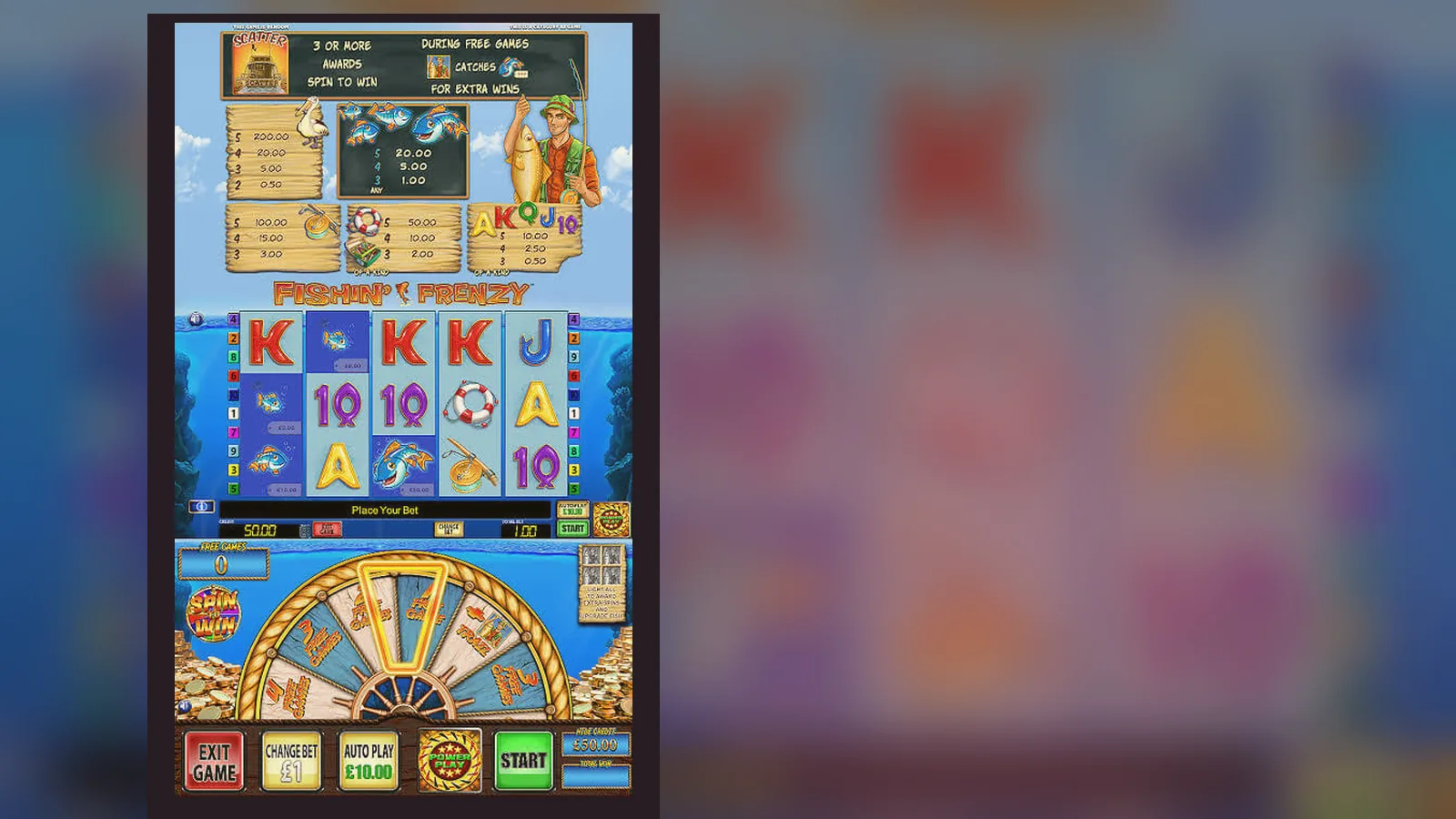
Here's the thing about slot apps in the United Kingdom: the UKGC doesn't licence games, it licences operators. Fishin Frenzy isn't its own app with a download page on the Play Store. It's a slot inside a casino site or app, and the casino holds the remote licence. If someone's offering you a standalone Fishin Frenzy APK with its own logo and splash screen, you're looking at a clone — and probably an unlicensed one.
Most UK players run Fishin Frenzy in a mobile browser or add the casino's web app to their home screen. A handful of UKGC-licensed operators publish native apps, and the game sits in their lobby alongside hundreds of others. This page walks through each path, what to expect, and the mistakes that cost people time, data, or worse.
What the store card would say if Fishin Frenzy had its own listing
It doesn't, but here's the shape of the game as a field list — the kind of metadata you'd see on a real casino app that hosts it. Numbers are plausible examples; actual operator apps vary.
Those figures reflect the operator app, not a standalone Fishin Frenzy client. If you see an APK claiming 10 million downloads and a 4.9 rating from a site you've never heard of, that's a fabrication.
Five screens you'll actually see when you open the game
- Casino lobby: a grid of slot thumbnails, search bar at the top, Fishin Frenzy somewhere in the Featured or Blueprint section. No standalone launcher — the game lives inside the operator's app or site.
- Loading screen: Blueprint Gaming logo, a quick animation of the fisherman and his boat, progress bar. Takes three to eight seconds on 4G, faster on Wi-Fi.
- Game grid: 5×3 reels, cartoon water background, bright blue sky. The fisherman sits in a dinghy on the left, tackle box on the right. Bet controls at the bottom: coin value, number of lines, spin button, autospin toggle, info panel. Paytable and rules are behind the ⓘ icon.
- Free Spins trigger: when you land three or more scatter symbols (the fisherman), the screen transitions to the bonus round. All fish symbols reveal cash values, and the total multiplies by the number of triggering scatters. The background darkens slightly, the music shifts, and a counter shows spins remaining.
- Paytable and settings: tap the ⓘ icon to see symbol values in your chosen stake, RTP (95.78% or the Jackpot King variant at 92.69%), and the rules for the free-spins feature. Tap the cog for sound, quick spin, and reality check intervals (required by UKGC for sessions over an hour).
That's the loop. No separate onboarding, no tutorial overlay, no in-game shop for coins. The only purchase path is the casino's deposit page, which sits outside the game and requires age and identity checks before you can fund an account.
Four ways to install it, and the risk of each
Most UK players never install anything. They open a mobile browser, log in to a UKGC-licensed casino, and tap the game. But if you want a home-screen icon or a native app feel, here are the paths and what can go wrong with each.
- Mobile browser (Chrome, Safari): visit the casino site, log in, find Fishin Frenzy in the lobby, tap to load. No installation, no storage used beyond cached assets. Risk: none, assuming the site holds a valid UKGC licence. Check the footer for the licence number and look it up in the UKGC public register. If the number's missing or doesn't match, you're on an unlicensed site.
- Add to Home Screen (web app): on iOS, tap the share icon in Safari and choose «Add to Home Screen». On Android, open the site in Chrome, tap the three-dot menu, and select «Add to Home Screen». The casino's icon appears on your phone, and tapping it opens a browser window without the address bar. Risk: low, but the web app is just a bookmark — it doesn't bypass the UKGC checks or let you play offline. Some players think it's a native app and expect app-like permissions (camera, contacts). It doesn't request those, because it's still a website.
- Operator's native app (Google Play or App Store): search for the casino brand, not «Fishin Frenzy». Download the operator's app, log in, and find the game in the slots section. Size is typically 60–120 MB, and the app may ask for location services (to confirm you're in the UK), notifications (for bonuses), and storage (to cache game assets). Risk: low if the app is published by a UKGC-licensed operator and matches the name in the register. Fake casino apps exist — check the developer name, read recent reviews for complaints about withdrawals or locked accounts, and verify the licence number in the app's footer against the UKGC site. A native app won't make the game faster or more generous; the RTP and rules are identical to the browser version.
- APK from a third-party site: someone offers a «Fishin Frenzy APK» or «Blueprint Gaming slots mod» on a file-sharing site, forum, or Telegram group. You download it, enable «Install unknown apps» in your Android settings, and sideload the APK. Risk: high. Most standalone slot APKs are one of three things: ad-laden clones that play for fake coins and monetise through video ads; phishing wrappers that collect your login for real casino sites; or malware that requests permissions for SMS (to intercept two-factor codes), contacts, and storage. Even if the APK is a legitimate copy of the operator's app, sideloading it means you skip the Play Store's malware scans and the operator's update pipeline. If the app asks for SMS, phone, or contacts permissions, delete it. Slots don't need those.
What your phone needs to run it without stuttering
Fishin Frenzy is a lightweight HTML5 slot, not a 3D game. It runs on most devices sold in the last five years, but here's the practical floor and what happens if you're below it.
- Operating system: iOS 13 or later, Android 8.0 or later. Older versions may load the game but struggle with the animation during free spins. If the reels judder or the fish symbols pop in late, your OS is the bottleneck.
- RAM: 2 GB minimum, 3 GB comfortable. On a 1 GB device, the game loads but the casino app or browser tab may reload mid-session if you switch apps. You'll lose your place but not your balance — the server tracks your state.
- Storage: 100–200 MB free for cached assets if you're using a native app. The browser version uses less but still caches images and sounds. If your storage is full, the game loads slowly and may re-download assets every session.
- Connection: 3 Mbps down, 1 Mbps up. The game itself is small, but the casino lobby pulls thumbnails and jackpot tickers in real time. On a weak connection, expect a black screen for 10–15 seconds before the reels appear. Autospin will pause if the connection drops, which is a UKGC requirement to prevent unintended bets during a network blip.
- Screen: 4.7 inches or larger recommended. The game scales to smaller screens but the bet controls and paytable icons become tiny. On a 4-inch display, you may tap the wrong button — especially the max-bet shortcut, which some players hit by accident and burn through their balance in three spins.
If you're on a budget Android from 2019 or an iPhone 7, you're fine. If you're on a 2016 device, the game will run but the experience won't be smooth.
What the app actually does (and what it doesn't)
Whether you're in a browser, a web app, or a native operator app, Fishin Frenzy does four things: it displays the reels and symbols, accepts your stake input, sends that input to Blueprint's server, and returns the result as an animation. The RNG runs server-side, not on your phone. Your device is a remote control.
- It does not store your balance locally. The casino's server holds your funds, and the game queries it before each spin. If you close the app mid-spin, the spin completes on the server and the result is waiting when you reopen.
- It does not let you play offline. Slots require a live connection to the RNG server. Clones that claim offline play are running a fake RNG and paying out nothing.
- It does not install separate software for bonuses or «VIP modes». If a site tells you to download a second app to unlock free spins or higher RTPs, you're being scammed.
- It does not bypass the £5 stake cap (or £2 for 18–24-year-olds). That limit is enforced by the operator's platform, not the game. If an APK claims to remove the cap, it's either lying or routing you to an unlicensed site.
The app's job is presentation. The actual gambling happens on a server that the UKGC audits. Your phone never sees the RNG seed, the payout table logic, or the session history beyond what the server chooses to display.
What changed in the latest version (and what didn't)
Blueprint pushes updates to the game logic every few months, but most players never notice because the core mechanics stay the same. Here's what's new as of early 2026, and what remains untouched.
- Reality check intervals: the game now pauses every 30 minutes by default and shows a summary of time played, net win/loss, and a prompt to continue or stop. You can adjust the interval in settings, but you can't turn it off — it's a UKGC rule that took effect in September 2025.
- Faster Payments integration: some operators added a quick-deposit flow that pulls up your bank's app via Open Banking, confirms the amount, and credits your account in seconds. This isn't a game feature; it's the operator's payment layer, but it shows up when you tap «Deposit» from within the game.
- Paytable currency display: the paytable now shows values in your account currency (GBP for UK players) rather than coins. Older versions required mental arithmetic to convert coin wins to cash. The maths hasn't changed, just the presentation.
- Reduced animation frames on low-end devices: if the game detects a device with less than 2 GB of RAM, it skips some of the water-ripple and bubble effects to keep the reels smooth. You still see the fish symbols and the free-spins transition, but the background is simpler.
What didn't change: the RTP (still 95.78% or 92.69% for Jackpot King), the free-spins trigger (still three or more scatters), the maximum win (still capped by the operator's daily win limit, often £10,000.00 or £20,000.00), and the stake range (still £0.10 to £5.00 per spin, or £2.00 for younger players). If a site claims a new version with higher RTPs or no caps, it's not the official game.
How to spot a fake clone and which permissions scream danger
Fake Fishin Frenzy apps are common because the game's popular and the branding is simple to copy. Most clones are ad farms or phishing fronts. Here's how to identify them before you hand over your details.
- The app has its own Play Store page under the name «Fishin Frenzy» or «Blueprint Slots», not the casino brand. Blueprint licences the game to operators; it doesn't publish consumer apps. If the developer is listed as «Blueprint Gaming Ltd» or «Fishin Frenzy Official», it's fake. The real developer name will be the casino operator, such as «Sky Betting & Gaming» or «Rank Group».
- The app requests SMS, phone, or contacts permissions during installation. Slots don't need to read your messages, make calls, or access your address book. Those permissions are for malware that intercepts two-factor codes or spams your contacts with phishing links.
- The app offers «unlimited free coins» or «daily bonuses without deposit». Real-money slots don't give you coins; they require a deposit, and the first one triggers KYC checks. If the app lets you spin for free indefinitely, it's a clone running a fake RNG to show you big wins and then ask for payment to «unlock» them.
- The app's screenshots show a different interface from the game you see in a browser. The reel layout, the fisherman's position, and the colour of the water are consistent across all legitimate versions. If the clone has a different background, extra buttons, or a «VIP» section, it's not the Blueprint original.
- The app's reviews mention withdrawal problems, locked accounts, or requests for additional payments. Real casino apps have complaints too, but fake apps have a pattern: users deposit, win, and then can't withdraw without paying a «processing fee» or «tax». That's not how UKGC-licensed sites work. Withdrawals take time for KYC, but they don't require extra payments.
The mistake that wastes the most time: assuming the app is faster than the browser
A quarter of the support tickets I've seen from UK players boil down to this: they download an operator's native app expecting it to load the game faster, pay out more often, or unlock features the browser version doesn't have. None of that is true.
The app and the browser hit the same server, use the same RNG, and return the same results. The app may cache the lobby thumbnails so the casino's homepage loads a second faster, but once you're in Fishin Frenzy, the experience is identical. The reels don't spin quicker, the free spins don't trigger more often, and the RTP doesn't change. If anything, the browser is slightly more flexible: you can open multiple tabs, compare stake settings across casinos, and avoid the app's notification prompts.
The app makes sense if you want a home-screen icon and you trust the operator enough to give it storage and notification permissions. It doesn't make sense if you think it's a shortcut to better odds. The odds are set by Blueprint and audited by the UKGC's testing labs. The delivery method — browser, web app, or native app — doesn't touch them.
One exception: some operators gate their best welcome offers behind the app. You'll see «app-exclusive 50 free spins» or «deposit £10.00 in the app and get £30.00 bonus». That's marketing, not a technical advantage. The terms are usually identical to the desktop offer, just rebranded. Read the wagering requirements before you claim — 35× to 50× turnover is standard in the UK, and the bonus funds expire if you don't clear them within 30 days.
FAQ
Can I play Fishin Frenzy offline once I've downloaded the operator's app?
No. The game requires a live connection to Blueprint's RNG server for every spin. The app may cache the graphics and sounds, but it can't run the game logic locally. If your connection drops mid-session, autospin pauses and you'll see a reconnection prompt. When the connection returns, any in-progress spin completes and the result appears. Your balance is never stored on your device — it's held on the operator's server and queried in real time.
Why does the game ask for location services, and can I deny it?
UKGC-licensed apps use location services to confirm you're in the United Kingdom when you open the app or start a session. It's not continuous tracking; it's a one-time check per session. You can deny the permission, but the app will either block you from playing or ask you to verify your location manually by uploading a utility bill. The requirement exists because the UKGC licence only covers players physically in the UK at the time of play. If you're abroad, the app should lock you out — if it doesn't, the operator's in breach.
I found an APK that claims to remove the £5 stake cap. Is that real?
No, and installing it puts you at serious risk. The £5 cap (and the £2 cap for 18–24-year-olds) is enforced by the operator's platform, not the game. Removing it would require bypassing the operator's server, which means the APK is either routing you to an unlicensed site or running a fake version of the game with a client-side RNG. Either way, you're not playing the real Fishin Frenzy, your funds aren't protected by the UKGC's rules, and you have no recourse if the site refuses to pay. The cap exists because of the Gambling Act's safer-gambling provisions. An APK that claims to remove it is advertising a crime.
The app updated and now the paytable shows pounds instead of coins. Did the payouts change?
The payouts didn't change; the display did. Older versions showed wins in coins, and you had to multiply by your coin value to get the cash amount. The new version skips that step and shows the cash value directly, using your stake and the symbol multiplier. The maths is identical — three wild symbols at a £1.00 stake still pay £200.00, whether the paytable says «200 coins» or «£200.00». Blueprint updated the UI to reduce confusion, especially for new players who thought coin wins were separate from cash.